Three Bars Run Your Life: Health, Stamina and Focus
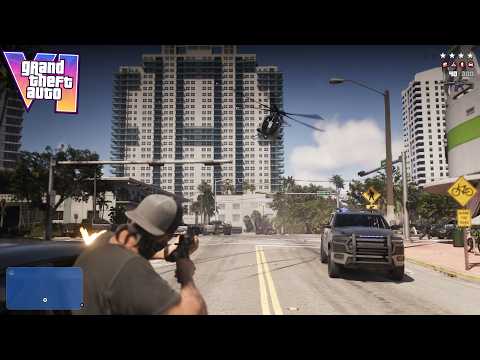
GTA 6’s HUD is built around three meters — health, stamina and Focus — and almost everything else on screen exists to support them. Beebom and Sportskeeda both published launch explainers on exactly this set: health, stamina, Focus and the icons around them.
Health is your survival bar, stamina governs how long you can run, swim and fight before exhaustion slows you, and Focus is the special resource: the meter behind the game’s slow, sharp, heightened-attention state, spent and refilled by how you live in the world.
Around those three sit the familiar instruments: a minimap and compass that can appear and fade, wanted stars when the law is interested, a fuel gauge when you fly or drive with the display enabled, and a weapon wheel that pauses nothing but organises everything. This guide walks through each element and the map icons you will meet most.
Key Takeaways
- The three core meters are health, stamina and Focus, and launch explainers from Beebom and Sportskeeda lead with them.
- Low stamina quietly weakens you: launch guides report it slows natural health regeneration.
- Focus is raised by rest, food, reading and even feeding Jason’s snake — and spent using heightened abilities.
- Navigation is dynamic by default: the minimap and compass appear when needed and fade when not.
- The fuel gauge appears above the minimap when enabled in the UI settings.
- Map icons are pictograms: a pink car-and-heart marks vehicle repair, a sneaker marks a shoe store.
- UI Text Size, subtitle mode and effect intensities can all be tuned in Settings if the HUD feels cluttered or faint.
Part 1 — The Three Bars, One by One
Health works as you expect, with one modern twist worth knowing: recovery is tied to your condition. GameSpot’s launch reporting, cited in our healing coverage, notes that low stamina slows your natural health regeneration — so an exhausted character heals worse.
Stamina is therefore not just a sprint meter. Running it dry before a fight quietly handicaps the fight itself, which is why the game keeps it beside health rather than hiding it in a menu.
Focus is the new headline meter. It powers the heightened state you trigger in key moments — the fishing lesson in Jason’s first missions even has you press L3 and R3 together to use Focus and spot fish beneath the surface.
Focus is also a lifestyle meter. Sleeping, eating the right food, coffee, reading books and magazines, a shower, and feeding Dolores, Jason’s pet corn snake, all raise it according to the launch guides — a design our Focus ability explainer explores in full.
Part 2 — Minimap, Compass and the Waypoint Route
The minimap is your local picture: streets, nearby icons, the police presence around you and the route line to your waypoint all live here. If an icon matters in the next two minutes, it is probably on the minimap first.
Navigation Experience, chosen on the first-launch screens and changeable later, controls how present these aids are. The Dynamic behaviour is the sensible middle ground: the minimap and compass appear when you need them and fade when you do not.
The compass earns its space on long cross-county drives and on foot in the wild, where the minimap’s detail runs out. Players chasing a clean, cinematic screen can go minimap-only, while collectible hunters will want the aids always on.
Set a waypoint and the game draws your route; that same waypoint is what other systems key off, including the auto-drive feature that follows the route for you. Our best settings guide covers the navigation and text-size choices that make this layer readable.
Part 3 — Wanted Stars and Police Information
When you commit a crime the game cares about, the wanted display appears: stars that count your heat level, backed by the police information the minimap shows around you.
The stars are a summary, not the whole story. GTA 6’s police track descriptions — what you are wearing, what you are driving — so the HUD’s job is to tell you how hot you are while the world underneath does the detailed work. Our guide to how the wanted system works covers that tracking in depth.
Behaviour cues sit alongside the stars: awareness and hit feedback effects flash how alert enemies are and whether your shots are landing, and their intensity is adjustable in Settings if the feedback feels too loud or too quiet.
The practical reading is simple. Stars rising means break line of sight and change something about yourself; stars flashing or falling means the search is cooling and patience is worth more than speed.
Part 4 — Vehicle and Flight Information
Get into a vehicle and the HUD adds its instruments. The most useful documented one is the fuel gauge, which appears above the minimap when enabled in the UI settings.
That gauge matters more than it sounds. Aircraft run dry on long exploration flights, and Beebom’s map guidance warns pilots to land when the gauge turns yellow rather than stretch a tank across open water.
Damage feedback is the other vehicle language: smoke stages from a suffering engine tell you a repair stop has moved from optional to urgent, long before the car gives up entirely.
Passenger and driver prompts belong to this layer too — the on-screen button prompts for entering vehicles, handing over the driving, or asking a partner to speed up are all UI, teaching you the inputs in the moment you need them.

Part 5 — The Weapon Wheel, the Phone and Prompts
The weapon wheel is the HUD’s inventory face. It organises what you carry into groups — including an Equipment tab, which is where tools like the fishing rod live when you need them at the pier.
Interaction prompts are the smallest UI elements and the easiest to miss: the contextual button hints that appear at a drywall sheet, a terrarium, a loose floorboard or a shop counter. In GTA 6, a prompt usually means a system is offering itself — home repairs, activities and stores all announce themselves this way.
The phone is a UI layer of its own. Press Up on the D-pad and your character pulls it out in the world — and the game does not pause while you look at it, which is why phone time belongs in safe places.
Mission text, objective markers and character-switch prompts round out the set. When the game wants you somewhere, the marker language is consistent: follow the on-screen objective marker for the story, and treat your own waypoint as a separate, player-set layer on top of it.
Part 6 — Map Icons You Will Actually Meet
The full map speaks in pictograms, and the fastest way to learn it is by the icons you will use weekly. Vehicle repair is a pink car-and-heart symbol — the mark over Coastal Auto Care in Key Lento, where the repair tutorial mission takes you.
Footwear is a sneaker icon: the earliest one sits over Flip Flop House off Sunbelt Highway in Key Lento, and the same symbol marks shoe stores across the state, so learning it once pays off everywhere.
Your safehouse icon is home base — bed, wardrobe, stash and pier all sit under it — while mission markers distinguish the story’s next step from side jobs and activities competing for your attention.
Shops and services reuse their symbols state-wide, which is the real lesson of the icon set: Rockstar teaches a symbol once, in a tutorial context, then trusts it everywhere. When a new icon appears, the game almost always introduces it before it tests you on it.
Part 7 — Tuning the HUD in Settings
If the interface feels cluttered or hard to read, the fixes live in Settings. UI Text Size was one of the first-launch choices and can be changed again at any time — raise it without shame if you play at TV distance.
Subtitles default to Mission Only, which captions key story and gameplay dialogue; switch them up if you want ambient lines captioned too, because street chatter often carries jokes and hints.
Navigation Experience, covered above, trades immersion against information. And the effect intensity sliders — player status, hit and awareness feedback — let you calm a noisy screen or sharpen feedback you keep missing.
Change one thing at a time and live with it for a session. HUD taste is personal, and the default dynamic setup is a better starting point than most players expect.
Frequently Asked Questions
What are the three main bars in GTA 6?
Health, stamina and Focus. Beebom and Sportskeeda’s launch HUD explainers both lead with this trio: health for survival, stamina for exertion, and Focus for the game’s heightened-attention state.
What does the Focus meter do in GTA 6?
It powers Focus abilities, triggered in documented moments with L3 and R3 together — for example spotting fish while fishing. Rest, food, coffee, reading and other calm activities refill it, per the launch guides.
Does stamina affect health in GTA 6?
Yes, indirectly. Launch reporting cited in our healing coverage notes that low stamina slows natural health regeneration, so arriving at a fight exhausted makes recovery weaker.
Where is the fuel gauge in GTA 6?
Above the minimap, when the display is enabled in the UI settings. Watch it in aircraft especially; when it turns yellow, land at the nearest airstrip.
What do the wanted stars mean in GTA 6?
They summarise your current heat level with the police. The deeper system tracks your clothing and vehicle description, so stars tell you how urgent it is to break line of sight and change your appearance.
What does the car-and-heart icon mean in GTA 6?
Vehicle repair. The pink car-and-heart marks Coastal Auto Care in Key Lento, where the repair tutorial takes place, and identifies repair services on the map.
What does the sneaker icon mean in GTA 6?
A shoe store. The earliest sits over Flip Flop House off Sunbelt Highway in Key Lento, and the same icon marks shoe stores across Leonida.
How do you open the phone in GTA 6, and does it pause the game?
Press Up on the D-pad. The game does not pause while the phone is out, so use it in safe places rather than mid-chase.
Can you make the GTA 6 HUD text bigger?
Yes. UI Text Size is offered on the first-launch screens and can be changed later in Settings, along with subtitle mode and navigation behaviour.
Can you turn the minimap off in GTA 6?
Navigation Experience controls how the aids behave. Dynamic fades the minimap and compass in and out as needed, and a minimap-only, cleaner presentation is available for players who want a more cinematic screen.
Reading the Screen Like a Local
Learn the three bars first, the wanted stars second and the map’s pictograms third, and GTA 6’s screen stops being noise. Every icon on it was taught to you once, on purpose — the HUD is not decoration, it is the game’s quiet second tutorial, running the whole time you play.