Yes, Your Car Can Drive Itself — Once You Switch It On
GTA 6 does have auto-drive, but it is not on by default for every situation. Beebom’s launch guide documents the full switch: go to Settings, then Gameplay, then Auto Drive, and set it to Unrestricted so the feature is available in all scenarios.
Once that setting is changed, auto-drive works through Cinematic Mode. You set a waypoint on the map, start driving, enter Cinematic Mode, and then hand control to the AI, which follows the route to your destination while obeying traffic rules.
There is also a second, quieter version of the same idea. When Jason and Lucia travel together, you can hand the wheel to your partner and ride as a passenger instead.
Key Takeaways
- Auto-drive lives in Settings under Gameplay, and it must be set to Unrestricted before it works everywhere.
- You must set a map waypoint first, or the Auto-Drive prompt never appears.
- Enter Cinematic Mode by holding Down on the D-pad and pressing Options on PS5 or Menu on Xbox.
- Hold Circle on PS5 or B on Xbox when the prompt appears to hand control to the AI.
- The AI obeys traffic laws and stops at red lights, so auto-drive is relaxed, not fast.
- Travelling with your partner? Hold Right on the D-pad and press R1 or RB to let them drive.
- L2 or LT slows the car down and R2 or RT speeds it up while auto-drive is running.
Part 1 — Step One: Change the Auto Drive Setting
Start in the menus, not in the car. Open Settings, go to Gameplay, find Auto Drive and switch it to Unrestricted.
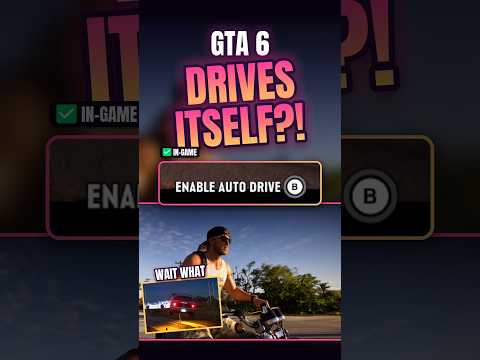
Beebom is clear that this setting is what makes the feature available for all scenarios, so skipping it is the most common reason the prompt refuses to appear later. Make the change once and it stays changed.
Do this while you are somewhere quiet. Fiddling with gameplay settings in traffic is a good way to meet a Leonida patrol car before you have even started.
If you are still tuning the rest of your setup, our guide to the best GTA 6 settings covers the other changes worth making in the same visit to the menus.
Part 2 — Step Two: Set a Waypoint and Get Moving
Auto-drive is route-based, which means it needs somewhere to go. Open your map and set a waypoint on your destination before you touch anything else.
Next, get into a vehicle with Triangle on PS5 or Y on Xbox and start driving normally. The feature does not engage from a parked car in the documented steps, so get rolling first.
Now enter Cinematic Mode: hold Down on the D-pad and press Options on PS5 or Menu on Xbox. The camera shifts to its cinematic framing, which is your sign that you are in the right mode.
Accelerate slightly with R2 on PS5 or RT on Xbox until the Auto-Drive prompt appears on screen. When it does, hold Circle on PS5 or B on Xbox, and the AI takes the wheel.
Part 3 — What the AI Driver Actually Does
The AI drives like a careful local, not like a player. Beebom documents that it follows the route to your waypoint, follows traffic rules, stops at red lights and avoids reckless driving.
Expect a slower, more scenic pace. The AI tends to take the longer, prettier way around Leonida rather than the aggressive shortcut a player would choose, so auto-drive trades speed for comfort.
That makes it ideal for long cross-state journeys, for admiring a district you have only ever rushed through, and for giving your thumbs a rest between missions. It is a poor choice when you are in a hurry.
You are not locked in. While auto-drive runs, L2 on PS5 or LT on Xbox slows the car and R2 or RT speeds it up, and holding Down on the D-pad exits Cinematic Mode and returns full control to you.
Part 4 — Let Jason or Lucia Do the Driving
When both leads are travelling together, there is a more natural option than the AI. Hold Right on the D-pad and press R1 on PS5 or RB on Xbox to switch characters and let your partner drive.
You ride as the passenger while the AI-controlled partner handles the journey. It is the same hands-free result, wrapped in a story-friendly package: the other character is visibly doing the work.
There is one passenger perk worth knowing. If you are sitting in the passenger seat, hold Right on the D-pad and press Square on PS5 or X on Xbox to ask your partner to speed up.
Partner driving only exists when the two are together, of course. Solo journeys still belong to Cinematic Mode auto-drive, and our full controls list for PS5 and Xbox is the place to check any other input mentioned here.
Part 5 — Auto-Drive, Fast Travel or Driving Yourself?
Auto-drive sits between two extremes. At one end is driving yourself everywhere, which is fastest in skilled hands but demands your attention for every mile of a 175 km² state.
At the other end is true fast travel. Beebom notes the RydeMe app as the skip option: order a ride, get in, and pay the $100 skip fee to jump straight to your destination. Our guide to how to fast travel in GTA 6 covers RydeMe and Paradise Taxi in full.
Auto-drive is the middle path. You still travel the distance in real time, you still see the world go by, but you do none of the work. Choose it for the journey, and choose fast travel for the deadline.
Price the trade honestly before long trips: a scenic AI route across several counties can take a while, and the $100 skip starts to look cheap when a mission is waiting.

Part 6 — Limits and Common Mistakes
The biggest mistake is forgetting the waypoint. Without a marked destination, the Auto-Drive prompt simply does not appear, no matter how correctly you enter Cinematic Mode.
The second mistake is skipping the Settings change. If Auto Drive is not set to Unrestricted, expect the feature to be unavailable in situations where you assumed it would work.
Third, do not treat auto-drive as an escape tool. A driver that stops at red lights and avoids reckless driving is not going to outrun a police response for you, and cinematic framing is the worst camera for a fight or a chase.
Fourth, remember the car still lives in the world while the AI drives. Traffic, junctions and other drivers are all still real, and the AI’s careful style is protection, not a guarantee. Take control back the moment a situation turns messy.
Finally, keep an eye on the basics on very long runs: your vehicle can still be damaged, and a route chosen for scenery is not chosen for safety. Auto-drive is a comfort feature, and using it that way is when it shines.
Frequently Asked Questions
How do you turn on auto-drive in GTA 6?
Set Auto Drive to Unrestricted in Settings under Gameplay, set a map waypoint, start driving, hold Down on the D-pad and press Options or Menu to enter Cinematic Mode, then hold Circle or B when the prompt appears.
Why does the Auto-Drive prompt not appear in GTA 6?
Almost always because no waypoint is set, or because the Auto Drive setting has not been switched to Unrestricted. Beebom documents both as requirements, so check the setting first and the map second.
What buttons enter Cinematic Mode in GTA 6?
Hold Down on the D-pad and press Options on PS5 or Menu on Xbox while driving. Once the cinematic camera is active, a small amount of acceleration brings up the Auto-Drive prompt.
Does the AI stop at red lights in GTA 6 auto-drive?
Yes. Beebom documents that the AI driver follows traffic rules, stops at red lights and avoids reckless driving, which is why auto-drive journeys feel slower and more scenic than driving yourself.
Can you change speed while auto-drive is on in GTA 6?
Yes. L2 on PS5 or LT on Xbox slows the vehicle down, and R2 on PS5 or RT on Xbox speeds it up, without cancelling auto-drive.
How do you take control back from auto-drive in GTA 6?
Hold Down on the D-pad to exit Cinematic Mode. Control returns to you, so be ready on the sticks and triggers the moment you press it, especially in traffic.
Can Jason or Lucia drive for you in GTA 6?
Yes, when the two travel together. Hold Right on the D-pad and press R1 on PS5 or RB on Xbox to switch characters and let your partner drive while you ride as passenger.
Can a passenger ask the driver to speed up in GTA 6?
Yes. From the passenger seat, hold Right on the D-pad and press Square on PS5 or X on Xbox to ask your partner to speed up.
Is auto-drive faster than driving yourself in GTA 6?
No. The AI takes a slower, more scenic route and obeys traffic laws, so a player driving directly will almost always arrive sooner. Auto-drive is about comfort and sightseeing, not speed.
What is the alternative if I do not want to travel at all in GTA 6?
Use the RydeMe app and pay the $100 skip fee once inside the ride to skip the journey entirely, as Beebom documents. Paradise Taxi offers another paid way to cover distance without driving.
The Relaxed Way Across Leonida
Auto-drive is a small feature that changes how a huge map feels. Set it to Unrestricted once, remember the waypoint rule, and Leonida’s long drives turn from chores into part of the show — with your partner ready to take the wheel whenever the story puts you both in the same car.