The Download Did Not Break — the Console Went to Sleep
If your GTA 6 pre-load was moving in the evening and had barely crept forward by morning, nothing is wrong with the download. The console slept, and the download slept with it.
A full shutdown stops downloads completely on both consoles, and even the sleep states need the right settings before they keep pulling data. Two short setting changes — one on PS5, one on Xbox — are the whole fix.
The pre-load itself is a big file: Rockstar says it will require up to 212 GB depending on your device, and the Xbox Store lists approximately 209.86 GB. At that size, overnight downloading is not a luxury. For most connections it is the only sensible way to be ready for the unlock at midnight local time on 19 November.
Key Takeaways
- A console that fully shuts down cannot download. Sleep states can — with the right settings on.
- PS5: turn on Stay Connected to the Internet under Rest Mode features, plus automatic downloads.
- Xbox: choose Sleep, not Shutdown, in Power options, and keep automatic updates on.
- Start the download before you sleep and watch the progress bar move — a queued download that never started will not fix itself overnight.
1. Why Downloads Stall Overnight
Both consoles have three states that matter here: fully on, a low-power sleep state, and off. Only the first two can move data, and the sleep state only does it when it has been told to stay connected.
The pattern players report is always the same. The download starts fine in the evening. The console is put away for the night — or puts itself away after an idle timer — and by morning the progress bar has barely moved.
Nothing corrupted and nothing needs reinstalling. The hours were simply never spent downloading. Our guide to how GTA 6 pre-loading works covers the timings; this article is about the power settings that decide whether those hours count.

2. PS5: The Two Rest Mode Settings
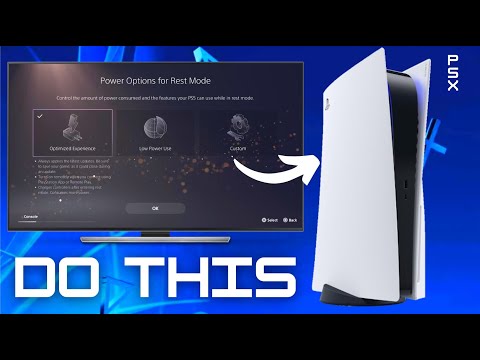
On PS5, the download survives the night only if Rest Mode keeps the network alive. The setting lives at Settings, System, Power Saving, Features Available in Rest Mode — turn on Stay Connected to the Internet.
Then give the console permission to fetch files on its own: Settings, System, System Software, System Software Update and Settings is where automatic download behaviour is managed on current firmware. With both in place, a download already running continues in Rest Mode, and queued content can start without you.
One habit matters as much as the settings: put the console into Rest Mode yourself rather than switching it off, and never cut power at the wall. A PS5 that loses power entirely is off, whatever the settings say. This short walkthrough shows the Rest Mode download settings on a real console:
3. Xbox: Sleep, Not Shutdown
Xbox Series X|S draws the same line with different words. At Settings, General, Power options, the console offers Sleep or Shutdown. Shutdown is a full power-off with faster savings and no background work. Sleep is the one that downloads.
Pair it with automatic updates: keep the “Keep my console up to date” and games-and-apps update options switched on, so a queued pre-load can start and continue while the console sits in Sleep.
The trap on Xbox is the energy-saving default. Many consoles were set to Shutdown long ago to save power and forgotten. One menu visit fixes it — and you can switch back after launch week if the power saving matters more to you than background downloads.
4. Before You Leave It Overnight
Sixty seconds of checking saves a wasted night. Run through this list before you walk away:
- Start the download manually and watch the progress bar actually move. Queued is not downloading.
- Confirm the free space first. Consoles can pause a download that runs out of room — our breakdown of how much storage GTA 6 needs and the GTA 6 download size shows the real numbers per console.
- Use a wired connection if you can. Wi-Fi that drops at 3 a.m. helps nobody.
- Put the console to sleep yourself — Rest Mode on PS5, Sleep on Xbox — rather than letting an idle timer or the TV’s power link decide.
5. Make the Night Count: One Download, Full Pipe
Settings decide whether the download runs. What else is on your network decides how fast. A 210 GB file crawling at half speed because three other devices are streaming and a second game is updating will still be crawling at breakfast.
Before the big night, pause other queued downloads and updates on the console — one active download gets the full pipe. On PS5, downloads queue behind each other, so check nothing sits ahead of GTA 6 in the queue. On Xbox, pause anything large under My Games & Apps, Manage, Queue.
Then read the estimate with suspicion. Both consoles show a time remaining figure that swings wildly in the first minutes. Give it ten minutes of steady downloading before believing it — and if the estimate still says days, the wired connection and a restarted router are worth more than another hour of hoping.
6. If It Still Stopped by Morning
If the settings are right and the bar still froze, work through it in order. Restart the console fully once. Pause the download, wait a few seconds, and resume it. Check the store services are up — on pre-load day, heavy demand slows everyone.
Also check for a power event you slept through. A brief outage, a tripped breaker or a smart plug on a timer all turn a sleeping console into an off console, and the morning-after evidence — a clock flashing on another appliance — is easy to miss. If the console asks you to repair storage or complains it was not shut down properly, that is your answer.
If the button itself looks inactive rather than paused, that is a different fault — our guide to the greyed-out GTA 6 preload button covers the licence fix. For anything wider, the full checklist in our GTA 6 pre-load not working fixes takes it step by step.
Frequently Asked Questions
Does the PS5 download games in Rest Mode?
Yes, if Stay Connected to the Internet is switched on under Features Available in Rest Mode. Without it, Rest Mode keeps the console reachable for charging and wake-up, but downloads pause.
Does Xbox download games while it is off?
Only in Sleep mode. A console set to Shutdown is fully off and downloads nothing until you turn it back on.
Why did my GTA 6 download move so little overnight?
Almost always because the console fully slept or shut down — an idle timer, the TV turning it off, or a power cut. With the sleep settings on, the same night would have finished most connections’ downloads.
Is it safe to leave a console downloading all night?
Yes. Rest Mode and Sleep are designed for exactly this and draw very little power. Keep the vents clear and do not switch the console off at the wall socket.
How long should the GTA 6 pre-load take?
It depends entirely on your connection. At a steady 100 Mbps, roughly 210 GB takes around five hours. Slower lines are exactly why the overnight settings matter.
Will the download resume where it stopped?
Yes. Both consoles resume partial downloads. You do not start again from zero because the console slept.
Do I need PlayStation Plus or Game Pass for overnight downloads?
No. Background downloading is a console feature, not a subscription feature, on both platforms.
My console turned itself off mid-download. Why?
Idle power-off timers and HDMI device link — the TV switching the console off with itself — are the usual causes. Lengthen the idle timer in power settings during pre-load week.
Can I start the download from the phone app?
Yes on both platforms, and the console still needs the sleep settings on to receive it. The app sends the instruction; the console’s power state decides whether it acts on it overnight.
When does the pre-load need to be finished by?
Any time before you want to play. The game unlocks at midnight local time on 19 November 2026, and a finished pre-load turns into the playable game at that moment.
Set It Tonight, Wake Up Ready
Two settings, one minute, and the biggest download of the year stops depending on you being awake to babysit it.
Sleep is not the enemy of this pre-load. Set up wrong, it is simply the pause button you never meant to press.